Description
Takes Control of Your Audio Display to Show Engine Data
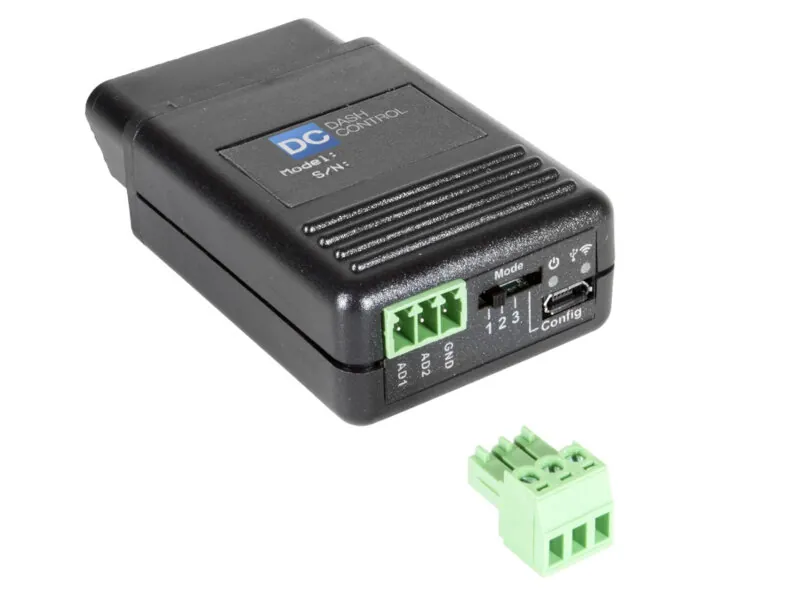
While having a set of gauges or a purpose-built performance monitor in your 2009-2014 F150 is always nice, your F150 already has an information display screen, and with Auto Meter’s DashControl-½ OBD-II display controller, you can now force your base F150’s dot-matrix display to show just about any performance information that’s output by your F150’s OBD-II port. All you have to do is plug the DashControl Controller into your home PC using the system’s included USB cable and DashControl-½ software, then plug the OBD-II controlled into your F150’s OBD-II port to display practically any information you need. Setup and install is incredibly straightforward, and you can get a clean way to get performance information to your truck’s built-in factory display.
Complete Kit with Module, Cable, and Software
The DashControl-½ Kit consists of an OBD-II controller module, USB cable, and software for your home PC. The controller features analog input ports that allow you to tie in aftermarket sensors so that you can display running information not output by your F150’s OBD-II port. The DashControl-½ system completely takes over you F150’s Dot-Matrix audio unit display in the upper part of your F150’s center console, and allows you to show just about any information you want after you configure its profiles using your home PC. Auto Meter includes detailed instructions for setup, and everything you need to get the system up and running on your truck.
Display Note: this version of Auto Meter’s DashControl-½ System only works on F150s equipped with base DOT-Matrix audio displays, and will not work on F150s with MyFordTouch Screens, the central instrument cluster LCD screens, or on base XL models without displays or integrated radios. Please ensure your F150 has the correct display before ordering.